Table of Contents
p.d Version 6 (with OptiBol)
 Version 6 is the first major software release of p.d in over a decade. Version 6 maintains the same look and feel as the previous version 5 software, but is greatly enhanced by the three major updates described below.
OptiBol™
Built on the Benefits of FlexiBol®, Optimized for Today’s Radiotherapy Workflows
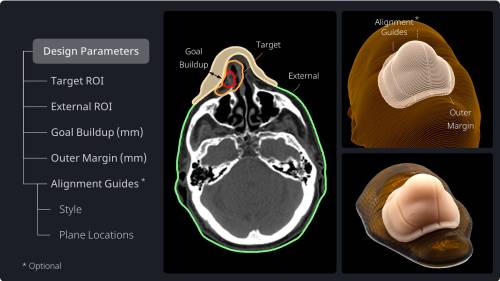
- Automated, variable-thickness bolus saves you time in bolus design and treatment planning
- Target-based design ensures the dosimetric buildup you need, where you need it, for any potential photon beam geometries
- Built-in alignment guides serve as an option to help radiation therapists in bolus and patient setup
- No added cost means the same device pricing as FlexiBol, with access for all customers
Bolus Wizard (Guided Approach)
- Major overhaul to Bolus Wizard workflow to improve clarity and enhance the end user experience
- Adds Bolus Size and Price information
- Adds checks for common errors/inconsistencies (e.g. check for unintended holes and disconnected pieces)
- Adds support for ordering Brass Electron Skin Collimators (please call to request access to this option)
Enhanced Order Wizard
- Expected Ship Date and Estimated Delivery Date/Time now shown when selecting order priority
How to Update
The process for updating p.d depends on the current version you have installed, so the first step is to check your current p.d installation version. This is done from the “About” page within p.d, which is accessed from the p.d main menu.
p.d version 5.3.8 (Legacy)
If your current version is p.d 5.3.8 (or below), then updates are done directly within the p.d software. Simply open p.d, login, and then from the main menu, select the “Check for Updates” option. A small pop-up message will appear in the bottom-left corner of the p.d software indicating the status of the update. Once the status shows “Updates Ready”, simply click it to complete the installation. As of June 29th, 2026 all users of version 5.3.8 and below should be available for updates.
p.d version 5.4.8 (Launcher)
If your current version is p.d 5.4.8 (or any 5.4.x version), then updates are managed via our website at direct.dotdecimal.com. Please log in to this website and select the “Manage” tab from the left side menu (if the Manage tab is not available, then please contact your supervisor to determine which user at your facility has been designated as the “Site Manager”). From the Manage tab, select a Site (location) and then change the version of the p.d App to reflect the latest available version, then click Apply. Now simply log into the decimal Launcher software as normal and p.d will show a “download” link to update to this latest version. Updates for 5.4.x users are scheduled to release by July 17th, 2026.
Need Assistance?
If you encounter any errors during the installation process or if you are interested in migrating from the Legacy version to the modern .decimal Launcher platform, our support team is ready to help.
- Call Support: 407-330-3300
- Email Us: customersupport@dotdecimal.com
- Hours: Monday - Friday [9am - 5pm ET]